

What if your entire DTF workflow could run on autopilot?
And no, we’re not talking about a DTF printer with a few clever features that takes one or two tasks off your hands.
(You probably already have one of those, right?)
We’re talking about something BIGGER.
Bringing your entire DTF production process together in one coordinated workflow.
And we mean ALL of it.
Printing. Cutting. Heat pressing. The whole shebang.
Three essential stages, working together instead of operating as separate steps you have to keep track of, manage, and coordinate.
Sounds ambitious?
Well, that’s exactly what ColDesi has done.
By bringing together the 24H5E DTF printer, the AcroShear automated cutting and slitting system, and the AP360 Automatic DTF Heat Press, ColDesi has connected three key stages of DTF production in one integrated workflow.
Now, here’s the idea.
Instead of managing printing, cutting, and heat pressing as separate tasks, you can bring these stages together, with each system handling its part of the process.
The goal? A more connected way to move through DTF production, without having to think of every stage as a separate operation.
So, let’s take a closer look at how these three systems work together—and what this integrated setup could mean for your operation.
Why Printing Speed Isn't the Only Measure of DTF Production Capacity
Let’s backpedal for a second.
There’s something about DTF production that doesn’t get talked about enough.
Ironically, it starts with one of the first things people look at when choosing a printer: print speed.
And honestly, that makes perfect sense.
When you’re shopping for a DTF printer, you want to know how fast it can print. The faster it prints, the more work you can get through, right? Especially when orders are piling up and you’re trying to grow your business without working yourself into the ground.
Just look at how DTF printers are marketed. One model advertises a certain print speed, the next promises to go faster, and the one after that pushes the numbers even higher.
Every new model seems to have a bigger number to show off.
There’s nothing wrong with wanting a faster printer. But it’s easy to get the impression that speed is what matters most in DTF production.
To be fair, there’s some truth to that.
Print speed matters. A lot. But there’s more to production than how fast a printer can print.
A DTF printer is just one part of the production process.
Once a transfer comes off the printer, it still needs to move through the rest of the workflow, from cutting and sorting to heat pressing onto a garment, peeling, and final finishing.
Each stage takes time, and any one of them can become a bottleneck.
Your actual production capacity depends on how well the entire workflow works together, not just how fast your printer runs.
That’s why it’s worth looking beyond advertised print speeds and considering what your production process can realistically handle.
Ask yourself how many transfers can you produce and process in a working day? How consistently can you maintain that output? And how much time is lost to handling, changeovers, downtime, or other interruptions?
These questions give you a much clearer picture of your real production capacity than print speed alone.
You can have the fastest DTF printer in the world, but if you’re spending more time handling transfers than printing them, that speed only gets you so far.
The same is true if your printer produces transfers faster than you can prepare or press them. Eventually, another stage of the workflow holds everything back.
And that bottleneck determines how much work you can actually get through.
So, instead of judging your production setup by print speed alone, look at the bigger picture.
How quickly can you go from printing a transfer to having a finished garment ready to ship? How much of your working day is spent actively producing, and how much is spent waiting, handling materials, or sorting out problems?
These questions give you a much clearer picture of your real production capacity than print speed alone.
Ultimately, a faster printer can certainly help increase output. But if another stage of your workflow is holding things back, upgrading your printing speed alone might not make as much difference as you expect.
So, while print speed is certainly worth paying attention to, it’s only part of the picture. What happens after printing is done matters just as much.
This is where it helps to look at your production process as a whole, rather than judging your printer by its speed alone.
Now that we’re on the same page, let’s look at the work that happens after printing, and the hidden labor costs of cutting, sorting, and pressing transfers.

Still running an entry-level DTF printer? Upgrading to 24” or 30” let’s you print bigger, faster, and cheaper per order. Learn more by clicking here.
The Hidden Labor Costs of Cutting, Sorting, and Pressing Transfers
We don’t have to tell you that there’s plenty of work to do after printing, do we?
As we touched on earlier, those DTF transfers still need to be cut, sorted, handled, and pressed onto garments. Then they need to be peeled off and given a final finishing press.
And even then, you’re not quite done. The finished apparel needs to be folded, stacked, and packed before it’s ready to ship.
It all sounds pretty straightforward when you list it like that.
But every one of those steps takes time.
And when you’re working through order after order, those minutes can add up to a surprising amount of labor.
And time, as you probably know, isn’t free.
Someone has to do all that cutting, sorting, pressing, peeling, folding, and packing. And whether that’s you, an employee, or a whole team, those hours have a cost.
It’s also the energy, equipment, space, and other resources that go into getting all that work done.
And someone has to cover the cost of all that extra work. If you’re running the business, that someone is you.
How to Identify Bottlenecks in a DTF Production Workflow
We’re really trucking along here.
In a short span of time we’ve covered a lot of ground.
We’ve established that print speed is only one part of the equation, and that everything happening after printing takes time, labor, and money, too.
But where are the biggest hold-ups in your DTF workflow, if you have any?
Let’s map out a typical DTF production workflow and see where the usual bottlenecks can crop up.
And to do this properly, we need to start at the beginning:
1. Artwork and file preparation
Before printing can begin, you need artwork to print. That might mean creating a design from scratch, buying or downloading a ready-made file, or working with artwork supplied by a customer. The file may then need to be resized, edited, checked for quality, and arranged into a gang sheet before it’s ready to print.
DIAGNOSE
How much time do you usually spend on all this? If it’s only a few minutes, great. But if you find yourself regularly spending a lot of time getting files ready, it’s worth asking whether this step is holding up the rest of your workflow.
2. Printing
Once your artwork is ready, it’s time to print. How long this takes depends on the printer you’re using, as different models offer different printing speeds. Print settings also matter, as choosing a higher-quality print mode can reduce the speed of production.
DIAGNOSE
Is your printer fast enough to keep up with your workload, or are print times slowing down your production? Could a faster printer help you get more done in less time?
3. Cutting and Sorting
Depending on whether you use roll-fed DTF film or pre-cut sheets, you may need to cut your transfers to size after printing. If you’re printing multiple designs on a gang sheet, you may also need to separate individual graphics and sort them by order.
DIAGNOSE
How much time do you spend cutting and sorting your transfers? Is this a quick step in your workflow, or does it take longer than you’d like?
4. Heat Pressing
Once your transfers are ready, it’s time to apply them to the garments. This involves positioning the transfer, heat pressing it, peeling away the film at the appropriate time, and, if required, applying a finishing press.
It’s a lot of manual labor, and the same steps need to be repeated for every single garment.
DIAGNOSE
How many garments can you realistically get through in an hour? Is your heat press keeping up with the rest of your production workflow, or are finished transfers piling up while you work through the garments?
5. Packing and Dispatch
The garments are printed, pressed, and ready to go. But before an order can reach the customer, it must be prepared.
That means folding garments, sorting them by order, packing them up, printing shipping labels, and getting everything ready for dispatch.
It might seem like the final, straightforward part of the process, but when you’re dealing with a high volume of orders, these tasks can take up a surprising amount of time.
DIAGNOSE
How much time do you spend folding, packing, and labelling orders? Could any of these tasks be made quicker or easier?
So, did you spot your bottleneck?
Maybe you did. Maybe you didn’t (or maybe you’re already running ColDesi’s automated DTF workflow, in which case, you’re a step ahead!).
Either way, it’s worth looking at where your time goes. Because once you know which tasks are slowing you down, you can start thinking about how to make them easier.
And what if you didn’t have to handle every single step yourself?
Imagine having your artwork ready to go, your printer running, and more of your production process taken care of automatically.
You’d still have plenty to do, of course. But spending less time on repetitive, hands-on tasks could free you up to focus on other parts of your business.
And that brings us rather conveniently to ColDesi’s automated DTF solutions and how it can help take some of the manual work out of your production process.
How ColDesi Can Help Automate Your DTF Production Workflow
Everything we’ve talked about up until this point has led us here — to our solution.
So, what exactly are we talking about? What does ‘this’ solution actually look like?
Drumroll, please…
Pretty neat, right?
You’ve just seen how the entire system works at a glance.
Now let’s go back through what you just watched and look at the three main pieces of equipment that make it all work.
We’ll include photos of each machine along the way, so you can get a better look and visit the individual product pages if you’d like to learn more.

DTF PRINTER
At the heart of the setup is, of course, the DTF printer. It’s where the process begins.
In the video above, we used the ColDesi 24H5E DTF printer to demonstrate how the system works.
However, you don’t necessarily need to purchase or use a new ColDesi DTF printer to make this setup work.
Depending on your configuration, you may be able to integrate your existing DTF printer into the workflow instead.
So, if you already have a printer you’re happy with, that’s one less piece of equipment to buy and one less expense to worry about.
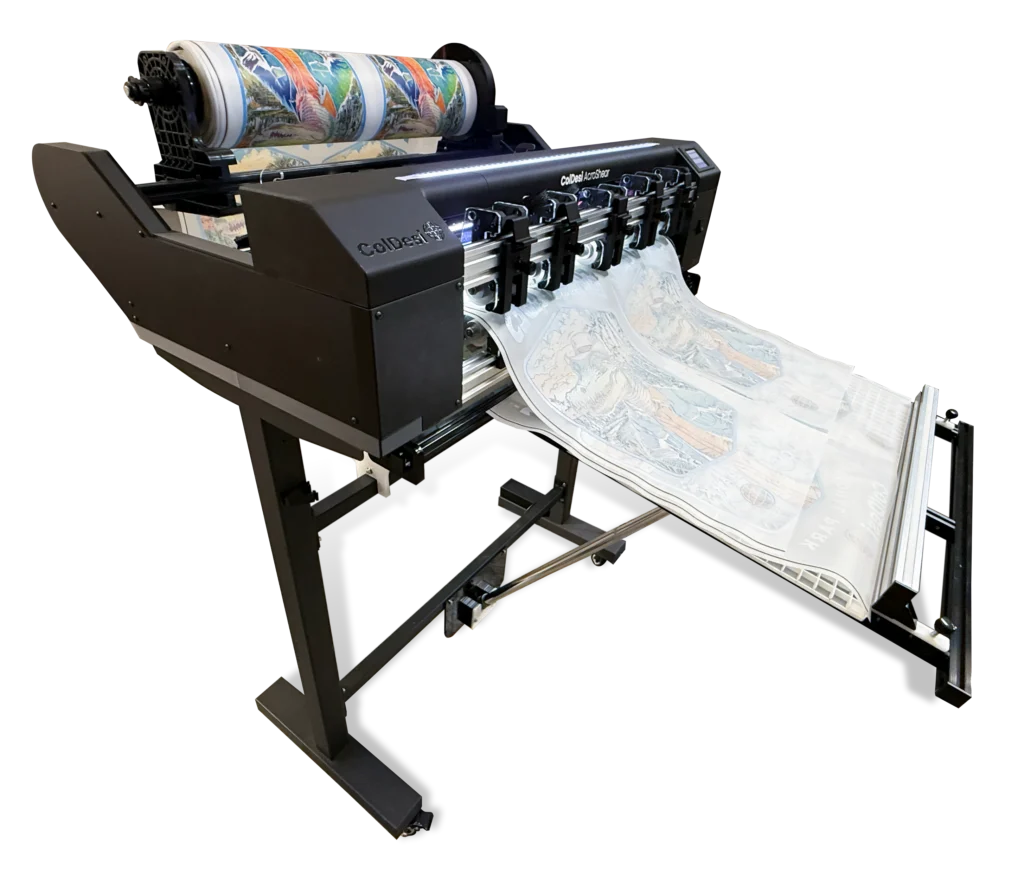
AcroShear Automated DTF Transfer Cutting System
Right in the middle of the workflow is the ColDesi AcroShear.
So, what is it, exactly? And what does it do?
In simple terms, the AcroShear automatically cuts printed and cured DTF film both across the roll and lengthwise, turning one continuous roll of film into individual transfer sheets.
Instead of having someone spend time cutting each transfer manually, the machine takes care of that step for you.
You can connect it directly after a DTF dryer to keep production moving, or use its automated unwind system to process rolls you’ve already printed.
Either way, you’re taking another repetitive task off your (or your team’s) hands.
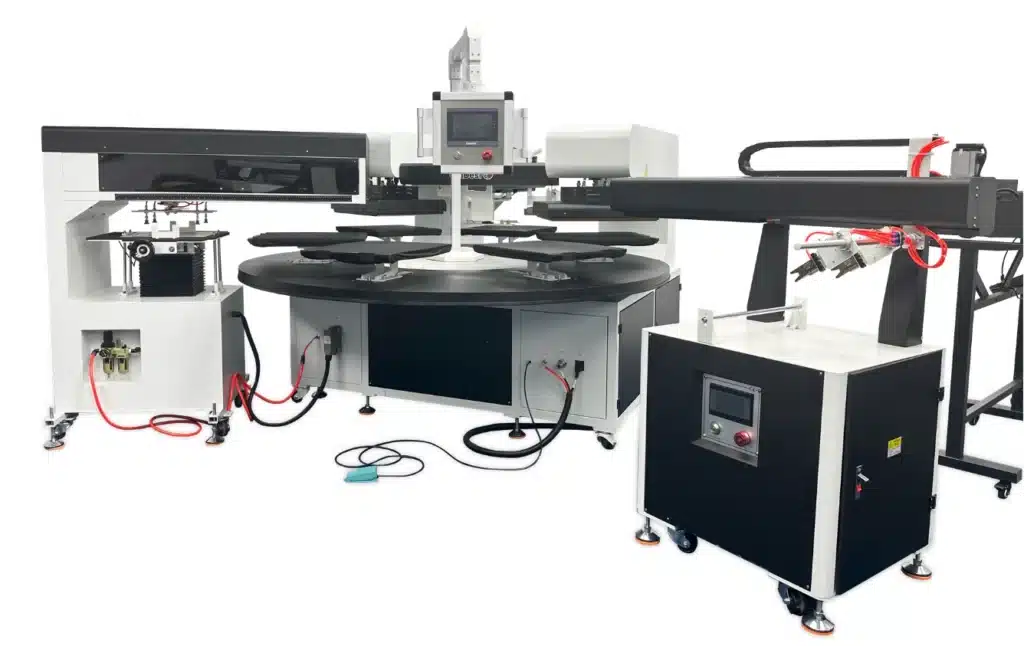
AP360 Automatic DTF Heat Press
Completing the automated DTF workflow is the AP360 automated press.
This is where your transfers finally make their way onto the garments.
The AP360 is designed to automate the heat-pressing process, helping reduce the amount of hands-on work involved in applying DTF transfers. Instead of having an operator manually position, press, and remove each garment from a traditional heat press, the AP360 handles much of that process automatically.
Bringing It All Together
And when you put all three pieces of equipment together, much of the DTF production process can be automated.
Your DTF printer produces the transfers. The AcroShear automatically cuts them into individual sheets. And the AP360 presses those transfers onto garments.
Each machine has its own job, but together they create a much more streamlined production workflow.
The result? A DTF setup that can help reduce manual labor, improve production efficiency, and make it easier to handle larger volumes of orders without having to do everything by hand.
And that’s really the point.
It’s about making your production process work smarter, so you can spend less time on repetitive tasks and more time growing your business.