
If you’ve played around with a few desktop UV printers, you’ve probably come to realize that they leave something to be desired.
They’re lovely little machines when you’re just getting started and exploring what UV printing has to offer.
But as your business starts picking up steam, they can start feeling rather limiting.
Well, that’s a bit of a pickle, isn’t it?
Just when things start looking up, your trusty little workhorse decides it’s not quite cut out for the big leagues.
But hey, you can’t really blame the little guy.
To be fair, it was never built to carry the weight of a growing business.
It got you started, helped you find your footing, and served its purpose.
But now? Well, maybe it’s time to give it a well-deserved retirement and bring in something with a little more muscle.
And lucky for you, we’ve got two ColDesi models that might just fit the bill: the UV300H3F and the UV500H3F.
Now, we know you’re probably itching to see what these machines can do. But hold your horses!
We’ve got plenty of time for that.
Before we get into all that, this whole upgrading shtick deserves a little more thought.
So, let’s lay some groundwork first.
Your Desktop UV Printer Got You Started. Is It Still Keeping Up?
Before we get gloomy, let’s look at the bright side here: your desktop UV printer has already done a pretty good job.
It helped you experiment, find your niche, build a customer base, and prove that people are willing to pay for what you make. (What more could you ask for, really?)
In other words, it paved the way for the next step in your business. Now, you’re considering upgrading to a more capable machine—one that’s ready to take on everything you’ve been working toward.
(And that’s actually something to celebrate!)
But that brings us to a million-dollar question:
How do you know when you’ve outgrown your desktop UV printer? And when is it time to invest in commercial equipment?
We’ll give you a little hint.
The fact that you’re here, reading this, might be a clue in itself.
But seriously, outgrowing your desktop UV printer isn’t usually something that happens overnight.
It’s more of a gradual thing…
So, let’s take a little trip down memory lane. Think back to when you first got your desktop UV printer.
You were probably excited to experiment, try out new products, and see what you could create, right?
Back then, it was everything you needed.
But a lot has changed since then.
Your business has grown. Your customer base has expanded. Maybe you’ve even added a few new products to your lineup.
What started as a way to experiment has become something much bigger.
And with that growth comes a whole new set of demands.
The printer that was once everything you needed might not be everything you need today.
However, that doesn’t necessarily mean it’s time to upgrade.
So, how do you know if you’ve really outgrown your desktop UV printer?
Let’s look at a few signs that it might be time to consider a more capable machine.
7 Signs It's Time to Upgrade to a Commercial UV Printer
By now, you might be starting to see why your trusty desktop UV printer may no longer be the best fit for your growing business.
But does that mean you’re ready for a commercial machine? Or are you just having an expensive daydream?
Well, before you start browsing machines with bigger print beds and considerably bigger price tags, let’s look at 7 signs that might help you figure it out.
1. You're Turning Down Orders Because You Can't Keep Up
One of the first signs that it might be time to upgrade to a commercial UV printer is that your desktop machine can no longer keep up with your growing order volume.
(What a surprise, right?)
But what does that actually look like in your day-to-day business?
See if any of this sounds familiar…
You’re working late into the night, trying to get through a growing pile of orders. Your regular working hours are no longer enough, and you’re constantly racing against deadlines to make sure every customer gets their order on time.
You’re taking fewer breaks, spending less time at home, and giving up your weekends just to keep production moving.
Growing your business is exciting. But it shouldn’t mean putting the rest of your life on hold.
Perhaps you’ve even hired an extra pair of hands to help manage the workload. Yet despite the additional help, your desktop printer remains the bottleneck. There’s only so much it can produce in a day, no matter how hard you or your team work.
And then there are the orders you simply can’t accept.
Potential customers are ready to buy, but your production schedule is already packed. You might even find yourself turning down projects from existing clients because you know you won’t be able to meet their deadlines.
That’s a frustrating position to be in. Demand is there, your business is ready to grow, and yet… your equipment is holding you back.
A commercial UV printer with greater production capacity could help take some of the pressure off.
2. Your Print Area Is Too Small
Another sign that it might be time to upgrade to a commercial UV printer is that your desktop machine’s print area is starting to limit what you can offer.
You’ve probably run into this before.
A customer asks you to print something a little bigger than usual. Or perhaps you’ve spotted a new product you’d love to add to your range.
But there’s just one problem: your desktop UV printer’s print area isn’t quite big enough.
Sure, you can always find ways to work around these limitations. But wouldn’t it be nice to take on bigger, more ambitious projects without having to figure out a workaround for every single one?
A commercial UV printer with a larger print area could open the door to new products, bigger orders, and plenty of exciting possibilities.
Think larger signage, bigger promotional products, or multiple items printed in a run.
A commercial UV printer with a larger print area could help you print products that simply won’t fit on your desktop machine.
3. You're Spending Too Much Time Printing One Product at a Time
Yet another sign that it might be time to upgrade to a commercial UV printer is that you’re spending too much time printing individual products.
When every product requires its own setup, positioning, and print cycle, things can get pretty time-consuming.
And if you’re printing dozens or even hundreds of products a day, those little tasks can quickly add up.
Before you know it, you’re spending most of your day loading products, starting prints, and waiting for the next job to finish.
That’s time you could be spending developing new products, marketing your business, or connecting with customers.
A commercial UV printer with batch-printing capabilities could help you streamline production, print multiple items in a single run, and make better use of your time.
4. Customers Are Asking for Products You Can't Make
Another sign that it might be time to upgrade to a commercial UV printer is that you’re starting to receive requests for products your current machine simply can’t handle.
Maybe a customer wants a personalized item made from a material you haven’t been able to print on. Or perhaps they’re looking for a product with a more complex design, a larger surface area, or a level of detail your desktop UV printer struggles to deliver.
And while it’s always nice to have customers asking for new things, it’s not so nice when you have to tell them you can’t make them.
Every product you can’t produce is a potential sale you’re missing out on.
A commercial UV printer with more advanced printing capabilities could give you the flexibility to expand your product range, experiment with new materials, and say “yes” to more customer requests.
And who knows? Those new products might just become some of your bestsellers.
5. You're Spending Too Much Time Maintaining Your Printer
Another sign that it might be time to upgrade to a commercial UV printer is that you’re spending too much time maintaining your current equipment.
Sure, every UV printer requires a little TLC from time to time.
But if you’re constantly cleaning printheads, troubleshooting errors, dealing with clogged nozzles, or performing maintenance just to keep your desktop UV printer running, things can get frustrating pretty quickly.
And let’s face it, you’ve got a business to run.
The last thing you want is to spend more time babysitting your printer than actually using it to make money.
A commercial UV printer designed for more demanding production environments could offer features that help simplify maintenance, improve reliability, and keep your business running smoothly.
Because at the end of the day, your printer should be helping you grow your business, not giving you another full-time job.
6. You Want to Start Working With Bigger Customers
There’s a big difference between printing a handful of personalized products for individual customers and fulfilling a large order for a corporate client.
And if you’ve been thinking about taking your UV printing business to the next level, landing those bigger customers could be just the opportunity you’ve been waiting for.
You could be eyeing corporate merchandise contracts, bulk orders from retailers, or partnerships with other businesses.
But larger customers tend to come with larger expectations.
They want consistent quality, reliable turnaround times, and the confidence that you can deliver when it matters.
And if your desktop UV printer is already struggling to keep up with your current workload, taking on a major commercial order could quickly turn into a logistical headache.
A commercial UV printer with greater production capacity and more advanced features could help you handle larger orders more efficiently, maintain consistent print quality, and meet demanding deadlines.
Because when you’re ready to play in the big leagues, your equipment needs to be ready, too.
7. The Cost of Staying Small Is Becoming Greater Than the Cost of Upgrading
Upgrading to a commercial UV printer is a significant investment.
If you’ve been running your business with a desktop machine, it’s understandable to hesitate before making the leap. Your current printer has served you well, and investing in a larger machine means taking on a substantial new expense.
But have you considered what staying where you are could be costing you?
Think about the orders you’re turning down, the time you’re spending on production, the products you can’t offer, and the opportunities you’re missing because your equipment can’t keep up.
When you add it all up, staying with your desktop UV printer could be costing you more than you realize.
Of course, a commercial printer comes with its own costs, including the initial purchase price, maintenance, and ongoing operating expenses.
The real question is whether the additional production capacity, capabilities, and efficiency could generate enough business to justify the investment.
A commercial UV printer isn’t just another piece of equipment. It’s an investment in your business’s ability to grow, take on new opportunities, and operate more efficiently.
And when the cost of staying small begins to outweigh the cost of upgrading, it may be time to stop putting off the decision and start thinking about what’s next for your business.
So is it time to upgrade to a commercial UV printer?
Well, if you recognise yourself in any of these seven signs, it might be time to start looking at commercial UV printers.
The good news is that there’s a whole world of opportunities out there!
But before getting into specific models, it’s worth understanding what sets commercial UV printers apart from the desktop machine you’ve been using.
To make the differences easier to see, we’ve put together a handy comparison table.
Let’s take a look at how the two compare.
Desktop UV Printer vs. Commercial UV Printer: What's the Difference?
Whoa! We’ve covered quite a bit, haven’t we?
By now, you should have a better idea of whether your trusty desktop UV printer is still keeping up with your business or whether it’s time for an upgrade.
But if you’re still weighing your options, we’ve got you covered!
To make things easier, let’s take a look at a side-by-side comparison of the two printers. (Because we know not everyone wants to wade through a wall of text.)
Desktop vs. Commercial UV Printers: Which Is Right for Your Shop?
| FEATURE | DESKTOP UV PRINTER | COMMERCIAL UV PRINTER |
|---|---|---|
| Primary use | Small-scale customization | Business production |
| Print area | Generally smaller | Larger options available |
| Production volume | Lower-volume work | Higher-volume potential |
| Batch printing | Limited by bed size | Greater batch capacity |
| Product size | Smaller products | Broader size options |
| Workflow | Often more manual handling | Greater production efficiency potential |
| Investment | Lower initial cost | Higher initial investment |
Hopefully, putting the two classes of UV printers side by side has helped clear up a few things and given you a better idea of what each brings to the table.
Now, where do we go from here?
What do you say we go over what to look for in a UV printer, as well as the company you’re buying it from?
That way, when we get to the actual models, you’ll know what matters most and what to keep an eye out for.
What to Look for When Choosing Your First Commercial UV Printer
Everything we’ve discussed so far has been all well and good, but… we haven’t yet gotten into the specifics of what you should pay attention to when buying your first commercial UV printer.
So let’s change that.
In this segment, we’re going to walk you through the key features, specifications, and practical considerations that can help you make a more informed buying decision—one that aligns with your current needs.
Print bed dimensions
One of the first things to consider when choosing a commercial UV printer is the size of its print bed, as it determines the maximum dimensions of the objects you can print on. Think about the types of products you plan to work with, whether that’s phone cases, promotional items, signs, or larger custom pieces, and make sure the printer’s working area can accommodate them comfortably.
Maximum printable object height
This ties in directly with the previous point, as the size of the print bed is only part of the equation. You also need to consider the maximum printable object height, which determines how thick or tall an object can be while still fitting under the printer’s printhead. This is especially important if you plan to print on items like bottles, phone stands, or other three-dimensional objects.
Material compatibility
Think about the materials you’ll be working with, whether it’s acrylic, glass, wood, metal, plastic, or other substrates, and make sure the printer is capable of handling them.
Production speed and quality
Production speed and print quality are two factors that go hand in hand when choosing a commercial UV printer. While higher print speeds can help you handle more orders and increase productivity, you also need to make sure the printer can deliver the level of detail, color accuracy, and consistency it advertises at those speeds.
White ink and clear varnish capabilities
White ink and clear varnish can significantly expand the range of products you can create with a commercial UV printer. White ink is especially useful when printing on dark or transparent materials, as it helps colors stand out, while clear varnish allows you to add gloss, texture, and other special effects to your prints. If these features are important for the products you plan to offer, make sure the printer supports them.
Rotary printing options
If you plan to print on cylindrical objects such as bottles, tumblers, or mugs, rotary printing is another feature worth considering. An integrated rotary printing system allows you to print directly onto curved surfaces by rotating the object during the printing process. This can open up additional product opportunities, so it’s worth checking whether the printer comes with an integrated rotary system or supports a compatible rotary attachment.
Software and workflow
The software you’ll be using is just as important as the printer’s hardware, especially when it comes to preparing and managing print jobs. Make sure the printer comes with reliable, user-friendly RIP software that supports the features you need and gives you control over color management, print settings, and job preparation. The easier it is to work with the software, the smoother your day-to-day printing operations will be.
Maintenance requirements
Before buying a commercial UV printer, make sure you understand what its regular maintenance involves. Some printers require more frequent cleaning and upkeep than others, so it’s worth looking into how easy it is to clean the printhead, maintain the ink system, and keep the printer in good working condition. The more straightforward the maintenance, the easier it’ll be to keep your printer running reliably over time.
Equipment footprint and electrical requirements
Make sure you have enough space to accommodate the UV printer, along with any additional equipment you’ll need for your workflow. It’s also important to check its electrical requirements, including voltage and power consumption, to make sure your workspace can support it without requiring costly modifications.
Training, technical support, and warranty coverage
Even the most reliable printer may need occasional troubleshooting, and having the right support can make a huge difference. Find out what kind of training is included, how easily you can reach technical support, and what the warranty actually covers. These details can save you a lot of headaches down the road, especially when you’re still getting familiar with the machine.
ColDesi Flatbed UV Printers: UV 300 H3F & 500 H3F
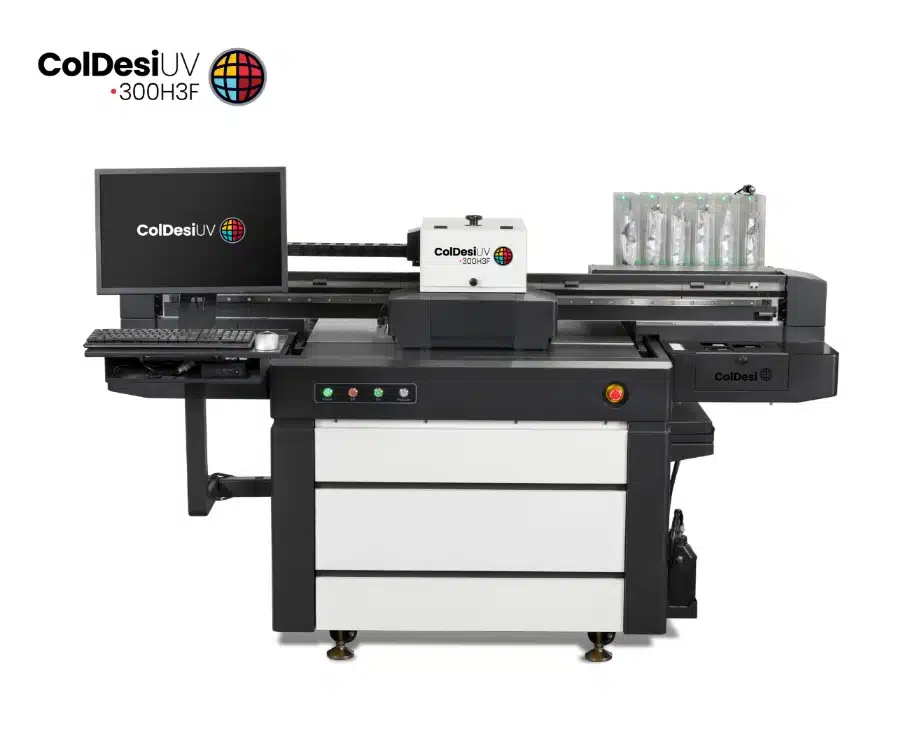
ColDesi UV 300H3F – A high-performance UV flatbed printer built for direct-to-object printing on a wide variety of rigid and cylindrical materials.
It offers a generous 36″ × 24″ maximum print area, giving you plenty of workspace for both small products and larger custom pieces.
This versatile machine features an integrated rotary system for cylindrical items and an automatic height measurement system, allowing you to print on objects up to 9+ inches tall. It’s ideal for applications involving irregular shapes and three-dimensional surfaces.
The ink level detection system is another handy addition. The cartridges have lights that let you know exactly where your ink levels are, so you don’t suddenly run dry in the middle of a job.
There’s also a print head collision prevention system, which uses anti-crash sensors to stop the moving print head if something’s in the way. It pauses the machine and brings it back to the starting point so you can make adjustments without risking damage.
And believe it or not, these highlights barely touch on everything it can do.

ColDesi UV 500H3F – A high-performance commercial flatbed printer with an impressive 63″ × 47″ print area, offering roughly 1.85 × more printable area than its “little” brother, the UV 300H3F.
It features a multi-zone vacuum table and a six-channel UV-LED ink system (CMYK + White + Varnish).
The 500H3F can print on objects up to 5.9 inches tall.
This height is lower than that of the 300H3F, but it is intentionally designed for users who prioritize maximum bed size and production efficiency over additional vertical height.
The printer also includes ink-level detection and printhead collision-prevention systems to make operation effortless and safe.
At roughly 2,170 lb, it’s nearly twice the weight of its little brother.
This added mass is proof that all that extra capability had to go somewhere.
Outgrowing Your Desktop UV Printer?
Explore ColDesi’s commercial UV printing solutions and discover equipment designed to support your next stage of business growth.