
Before you spend a dollar on a DTF printer, there’s something you need to understand…
…and it’s this:
You’re not just buying a printer, you’re buying into something BIGGER than the machine itself.
Whether you realize it or not, you’re buying into a company, a system, and an entire ecosystem built around that machine.
Now, if you’re sitting there thinking, “Okay… but what does that actually mean for me?”
Fair question.
It means that when you’re comparing DTF solutions, you need to look BEYOND the printer itself.
You need to ask yourself a few important questions BEFORE you buy:
- Who am I actually buying from? Are they legitimate, established, and will they still be around when I need them?
- What happens after I buy? Is there real support, service, training, parts, consumables… and an actual human being I can call when something goes wrong?
- Does the whole system work together? Do the printer, dryer, powder, software, and workflow actually function as one complete ecosystem, or am I left to piece everything together myself?
- And what do the businesses already using it have to say? Are they happy with the equipment, the results, and, perhaps most importantly, the company behind it?
You probably won’t find the answers to those questions by simply looking at a printer’s specifications or flipping through a brochure.
Because specs can tell you what a machine can do. They don’t necessarily tell you what it will be like to OWN one.
And that brings us to another problem with trying to find the “best” DTF printer:
There may not be one “BEST” DTF printer for you in the first place. Because the right machine depends on what you’re actually trying to do.
(Bet you didn’t think of it that way.)
Let’s say, for example, you’re producing a few hundred transfers a week. In that case, you don’t need (or have room for) a massive production system. Maybe you’re already producing thousands of transfers a week.
Now you need something capable of handling a much higher production volume. Or maybe you’re somewhere in between. You also need to think about where you want your business to be six months, a year, or even two years from now.
If you’re planning to grow into a much higher-volume operation, you don’t want to buy the cheapest or simplest machine today only to replace it when your business takes off.
That’s why the right DTF printer isn’t necessarily the one with the best specs, the lowest price, or the highest production capacity.
It’s the one that fits your business and comes from a company (and ecosystem) that can support it.
So, rather than asking which DTF printer is “the best,” there’s a better question to ask:
Which DTF printer (and which company behind it) is the right fit for my business, now and as I grow?
Now that’s the question worth answering. That’s what we’re going to help you figure out.
We’ll look at what actually separates one DTF solution from another, how to match equipment to your production needs, and what you should expect from the company standing behind the equipment.
And what you need to know before you make a decision you could be living with for years. By the time you reach the end of this guide, you should have a much clearer idea of what you actually need (and what you probably don’t.)
And that could save you from making a very expensive mistake.
So, let’s talk about what you should actually be looking for.
Introduction: There Is No Single "Right" DTF Printer
Remember what we said earlier about there not being one “right” DTF printer?
Good.
We think that gives us a useful place to start. Because one of the easiest mistakes you can make when you’re shopping for DTF equipment is to start by looking at the machines instead of looking at your business.
It seems like the obvious thing to do. You look at print speed, print width, number of printheads, features, price, etc.
And before you know it, you’re comparing one machine against another, looking at specifications, trying to decide which one is “better” without ever stopping to ask the more important question:
What does your business ACTUALLY need?
It’s worth sitting with that question for a minute. Because there really isn’t one answer to that question.
It depends on the business.
It depends on what you’re producing, how you’re producing it, and what your day actually looks like. For example, if you’re producing a few dozen transfers a day, you’re dealing with one set of problems.
You may not have a lot of floor space. You may have one person doing most of the work.
You may be bringing transfer production in-house for the first time and want something that doesn’t require a huge investment or a complicated production setup.
That’s a very different situation from a business that’s already fulfilling hundreds or thousands of garments and needs to keep production moving day after day.
In that situation, production speed becomes much more important.
So does print width. So does automation. And so does the amount of labor required to keep the equipment running.
A difference that might seem relatively minor when you’re looking at two machines on a specification sheet can become a very real difference once you’re actually running that equipment every day.
And there’s another thing you need to think about, too:
Where do you expect your business to be six months from now? A year from now? Two years from now?
Now, we’re NOT suggesting you should buy the biggest DTF system you can afford simply because you hope your business will grow.
That’s one way to spend a lot of money solving a problem you don’t actually have yet.
But the opposite can be a problem, too.
You can buy something that seems perfectly adequate today and discover, not that far down the road, that you’ve outgrown it.
And now you’re having the equipment conversation all over again.
So we think there’s a middle ground here. You don’t need to predict the future. You probably can’t.
What we’re saying is that it makes sense to have some idea of where you’re going before you decide what you’re going to buy.
If you’re planning to grow substantially, that should be part of the decision. You don’t want to save a little money today only to discover you’ve bought yourself a problem you’ll have to solve all over again when your production volume increases.
On the other hand, if you’re producing a few dozen transfers a day and have no particular reason to believe that’s going to change anytime soon, why pay for production capacity, floor space, and complexity you’ll never use?
You shouldn’t.
And THAT brings us back to the point we started with:
There is no single “right” DTF printer.
The right system depends on what you’re trying to accomplish, how you’re operating today, and, probably more than anything else, where you expect to go next.
And this is one of the things we think is worth keeping in mind when you look at the ColDesi lineup.
ColDesi currently offers six commercial DTF printer and dryer solutions, ranging from more compact systems for businesses that want to bring transfer production in-house to advanced five-head systems designed around high-volume production.
In other words, there isn’t one machine we’re trying to make everybody fit into.
And that’s really what we’re getting at here.
Because the conversation shouldn’t begin with, “Which printer should you buy?”
It should begin with, “What are you trying to accomplish with it?”
Once you know that, you can start narrowing things down.
How much are you producing now? How much space do you have? How much labor can you dedicate to production? How much of the process do you want to automate? How quickly do you expect production to grow?
Those answers will tell you FAR more about the kind of system you should be looking at than a list of specifications on a page.
And that’s the approach we’re going to take throughout the rest of this guide.
We’ll start with your business and work our way toward the equipment.
Because when you approach it that way, you’re not trying to make your business fit the printer.
You’re finding the printer that fits your business.
And that’s a much better place to start.
So, before we get into the details of each system, let’s take a step back and look at the complete ColDesi DTF lineup.
Once you can see the lineup side by side, you can start to see the differences in the main features, selling points, and who each system is really geared toward.
From there, you can concentrate on the systems that make the most sense for your business.
Six DTF Printer & Dryer Solutions. One Supplier.
Up to this point, we’ve been talking about how you should THINK about choosing a DTF printer.
But what does that actually look like when you start comparing the systems available to you?
Well… let’s look at the actual choices in front of you.
As we mentioned above, ColDesi offers six commercial DTF printer and dryer solutions, each built around a different level of production and, frankly, a different kind of business.
And when you put them side by side, you start to see just how DIFFERENT each can be.
Some systems are designed to make more sense for businesses bringing DTF production in-house for the first time.
Others are built for businesses that have already reached a level of production where speed, capacity, and workflow become much bigger considerations.
And then there are systems designed for businesses operating at an even higher volume, where the question isn’t simply whether you can produce the transfers you need, but how efficiently you can keep up with the demand.
That’s why it helps to look at the entire lineup before zeroing in on a single machine.
Rather than starting with one machine and trying to decide whether it’s “good enough,” you can see where each system fits and what kind of business it was designed for.
So, before we get into any one machine, let’s look at the lineup as a whole.
Here’s how the complete lineup compares:
| MODEL | POSITIONING | PRINT WIDTH | APPROX. 8" × 10" TRANSFERS/HOUR* |
|---|---|---|---|
| 12H2 | Starting out / compact production | 12" | 50 |
| 19H2 | Growing shops | 19" | 95 |
| 24H2 | Growing commercial production | 22.5" | 100 |
| 30H2 | Serious production | 28.5" | 180 |
| 24H5 | High-volume production | 22.5" | 400+ |
| 24H5E | Maximum automation | 22.5" | 300+ |
(Production figures based on 8″ × 10″ transfers. Actual production can vary.)
The numbers give you a good starting point…
But keep in mind, they’re not meant to predict exactly what you’ll produce every day.
Your actual output will depend on the size and type of transfers you’re printing, your artwork, your workflow, and how consistently the system is being run.
In other words, your mileage may vary.
So use the figures above for what they’re really good at:
Giving you a sense of the production range each system is built for.
Then we can start looking more closely at what each one offers and how that fits your business.
From here, we can take a closer look at what each system offers and how it fits your business.
Choosing the Right ColDesi DTF Printer for Your Production Level
Now that you’ve seen all six systems side by side, it’s time to take a closer look at what sets them apart.
Because the table gives you just the numbers. And while those numbers are useful, they only tell you so much.
We need to put them in context and see how those specifications translate to real-world production.
So let’s look at all six systems, starting with the lower-volume production options and working our way up. Along the way, we’ll look at what each machine is built for, where it fits in the lineup, and the kind of production it makes sense for.
Let’s start with the first one.
ColDesi DTF 12H2
(Best For: Startups & Home-Based Businesses)
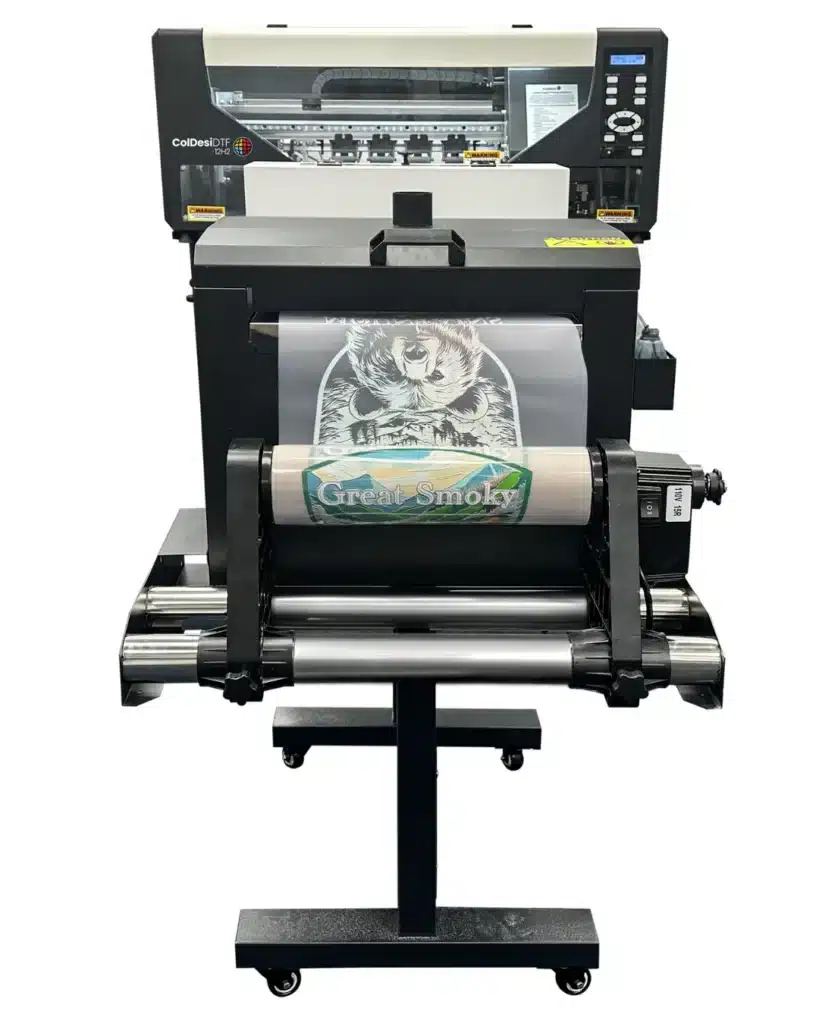
Not everyone needs a large production machine, would you agree?
In fact, if you’re just getting started with DTF printing, buying more printer than you need can end up costing you money without adding much value.
That’s exactly where the new and upgraded DTF 12H2 comes in.
The 12H2 is designed for startups, side hustlers, home-based businesses, shops with limited space, and anyone looking for an affordable way to get into DTF printing without making a massive upfront investment.
It gives you the ability to create professional-quality DTF transfers while keeping your equipment costs manageable.
For many customers, it’s the perfect first step into the world of DTF printing.
And as your business grows, you can always move up to a larger machine with greater production capacity.
What Makes the DTF 12H2 Unique?
For starters, it comes in two different configurations, The Basic Starter Package ($7,995), and the Standard Package ($9,995). Both feature the exact same printer and include the printer stand.
The core difference lies entirely in the additional equipment bundled with each package.
For the price, it’s hard to find a DTF printer that will do more. To give you a high-level overview of its features and technical specifications.
From a visual standpoint, it’s the smallest printer in the ColDesi lineup. All things combined, it measures in at just 39.5″ x 65″, and can easily fit through a standard shop doorway (something you can’t always say about its bigger brothers (a.k.a. our flagship models).
Now, just because it’s the smallest in the range, doesn’t mean that it compromises on function or experience. While it is a more ‘’trimmed down’’ version of those models, it still packs a punch with its print speed of around fifty 8”x10” transfers an hour, dual print head, and a generous 12’’ wide print field.
We’re talking full-color transfers that can be applied to a wide variety of garments with as little as a 10-second initial press time.
If you choose the Basic Starter Package, things get even more compact since the package does not include the shaker/dryer unit found in the Standard package. As a result, the footprint is significantly smaller, with the printer itself measuring just 28.5″ x 39.75″ and weighing only 165.4 lbs.
It’s small enough for a desk and, again, slim enough to fit through a standard doorway. So, perfect for home offices, small shops, or tight spaces.
Plus, it comes with an optional stand for those who want a dedicated workspace.
The 12H2 is also quiet, runs on a standard 110V outlet, and arrives fully assembled. Combined with the included training, it makes getting started much less intimidating for first-time users.
And did we forget to mention that another standout feature of the upgraded DTF 12H2 is its expanded color system? Yes, by adding Orange and Green inks to the standard color set, the printer can now produce a 27% wider color range and approximately 100,000 more printable colors. That translates into smoother gradients, richer colors, and more vibrant, eye-catching transfers.
And that’s really what makes the DTF 12H2 unique.
Its size, simplicity, and ease of use make it a true desktop DTF printer. One that’s designed to help new businesses get started, learn the process, and begin generating revenue before making the jump to larger equipment.
ColDesi DTF 19H2
(Best For: Growing Businesses Ready for More Capacity)
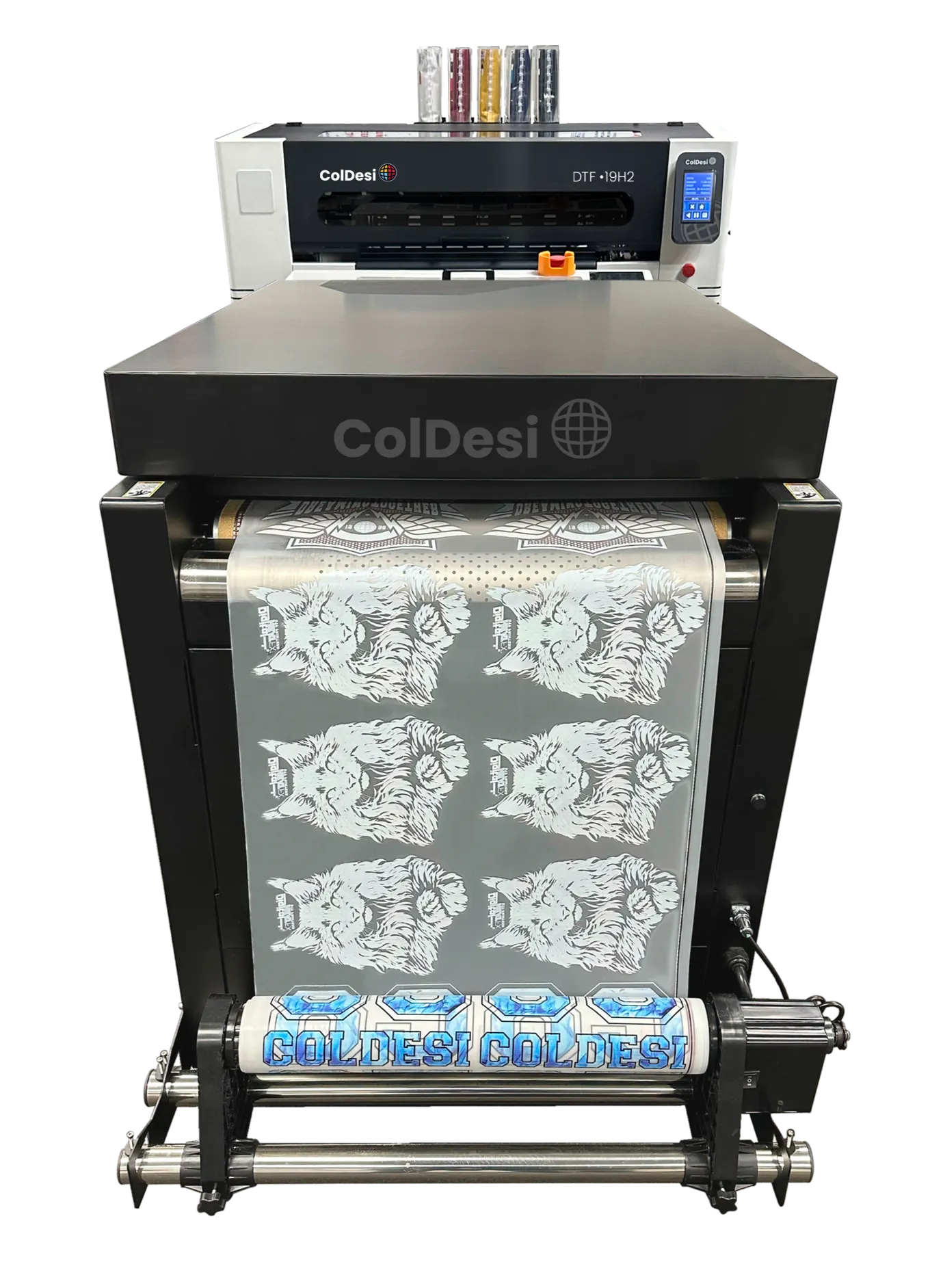
What if the 12H2 feels a little too small, but you’re not quite ready for a large production system?
That’s exactly where the DTF 19H2 comes in as a solution. In fact, it may be the machine you’ve been looking for all along.
As the newest addition to the ColDesi DTF lineup, the 19H2 was designed to fill the gap between entry-level DTF printing and larger production equipment.
It offers both more print width and more speed than the 12H2, while still maintaining a footprint that’s practical for many small and mid-sized shops.
For businesses that have moved beyond the startup phase and are looking to increase output without making the jump to a full-scale production machine just yet, the 19H2 often hits the sweet spot between size, performance, practicality, and investment.
So, what do you actually get with the DTF 19H2?
Quite a bit, actually.
For starters, you get a generous 19-inch print width, giving you more room to fit larger graphics and gang multiple designs together on a single sheet. That means less wasted film and more productivity from every print run.
It may seem like a small upgrade on paper, but when you’re trying to squeeze a few more transfers onto each sheet, those extra inches start paying for themselves.
Under the hood, you’ll find two Epson i1600 print heads working together to deliver fast, consistent output. The result is production speeds of around fifty 8″ x 10″ transfers per hour, making it well-suited for growing businesses with increasing order volumes.
The 19H2 also features an automatic tension (dancer) system that helps keep the film feeding smoothly throughout the printing process. It’s one of those features you may not think about at first, but after you’ve dealt with a few feeding issues, you quickly realize just how valuable it is.
This system plays an important role in maintaining consistent print quality and reducing the chances of feeding issues during longer print runs.
And despite the added capability, the 19H2 remains surprisingly manageable from a space standpoint. The complete system has a footprint of approximately 48″ x 108″, allowing it to fit comfortably into many small and mid-sized production environments.
It’s also worth noting that the complete system weighs roughly around 800-900 lbs. That’s not unusual for commercial printing equipment, but it’s probably not something you and a friend are carrying into the shop on a Saturday afternoon.
So it’s something you’ll want to think ahead about before delivery day.
Another nice bonus? Like the 12H2, the 19H2 runs on standard 110V power and requires a 20A circuit. In other words, you won’t need specialized electrical work just to get the printer installed and running.
In many ways, that’s what makes the 19H2 so appealing. It delivers more print width, more production capacity, and more efficiency without dramatically increasing the space or infrastructure requirements.
For additional peace of mind, the printer also comes backed by a one-year warranty, including six months of coverage on the print heads.
In many ways, it’s the printer customers graduate to when they’ve proven their business model and are ready for the next step.
ColDesi DTF 24H2
(Best For: Established Commercial Production)
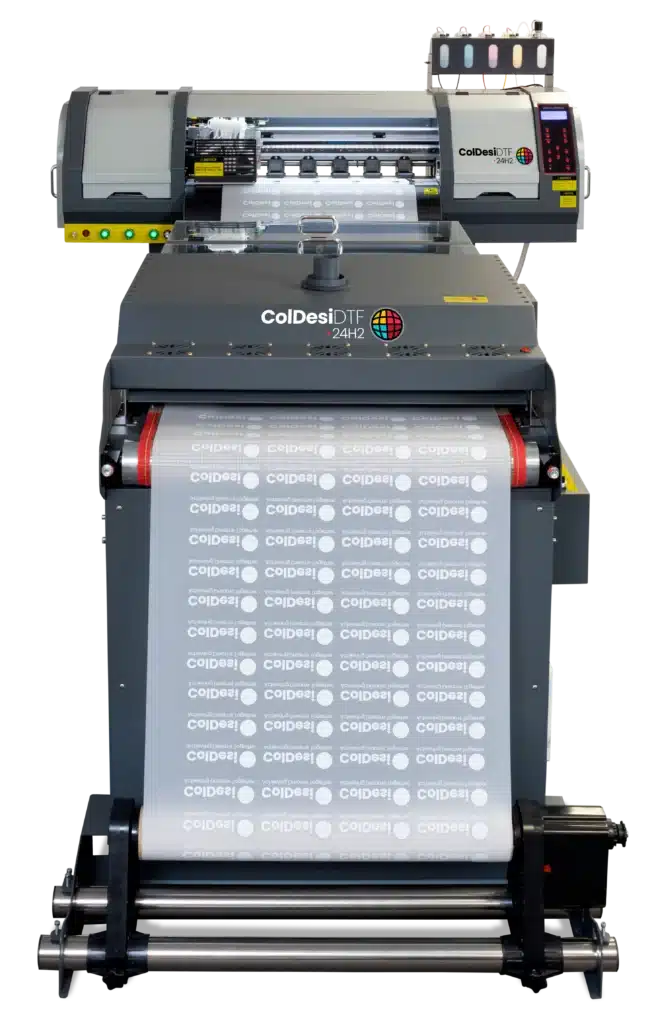
If the 12H2 gets you started and the 19H2 helps you grow, the 24H2 is built for businesses that have already proven there’s demand for what they sell and simply need equipment that can help them produce more.
It’s a great fit for apparel decorators, custom product businesses, and print shops with a steady flow of orders. Compared to the smaller H2 models, it offers more print width, more speed, and higher output, making it a natural next step for growing businesses.
So, what makes it different?
For starters, you get a generous 24-inch print width, giving you even more room to gang transfers together and maximize every inch of film. It might not sound like much on paper, but if you’ve been in the DTF business for any length of time, you already know that fitting just a few more graphics onto each run can make a meaningful difference in both material costs and overall productivity.
The 24H2 is powered by two Epson i3200 print heads. Compared to the smaller 12H2, they offer higher print resolution, improved ink management, and faster production speeds. They’re also designed for the demands of higher-volume printing, making them a solid choice for businesses producing transfers day after day.
Production is another area where the 24H2 pulls ahead. It can print around 45 to 55 linear feet per hour, or roughly 100 standard 8″ × 10″ transfers in the same amount of time. That makes it well suited for shops handling larger orders, repeat customers, or simply a heavier day-to-day workload.
The printer also comes with a built-in fume extractor, so there’s no need to purchase or install a separate extraction system. It’s one less thing to think about when getting everything set up.
The complete system measures approximately 144.5″ × 67.5″, and the printer arrives fully assembled, weighing in at around 562 pounds.
No, it’s probably not something you’re rolling into the shop with a couple of friends on a Saturday afternoon. But once it’s in place, it’s built to handle the kind of workload many growing businesses eventually reach.
The DTF 24H2 isn’t meant to be your first printer, and that’s okay. It’s the kind of machine many businesses end up with after they’ve spent some time growing their customer base and are ready to produce at a much higher volume.
ColDesi DTF 30H2
(Best For: Established Commercial Production (similar to the 24H2))
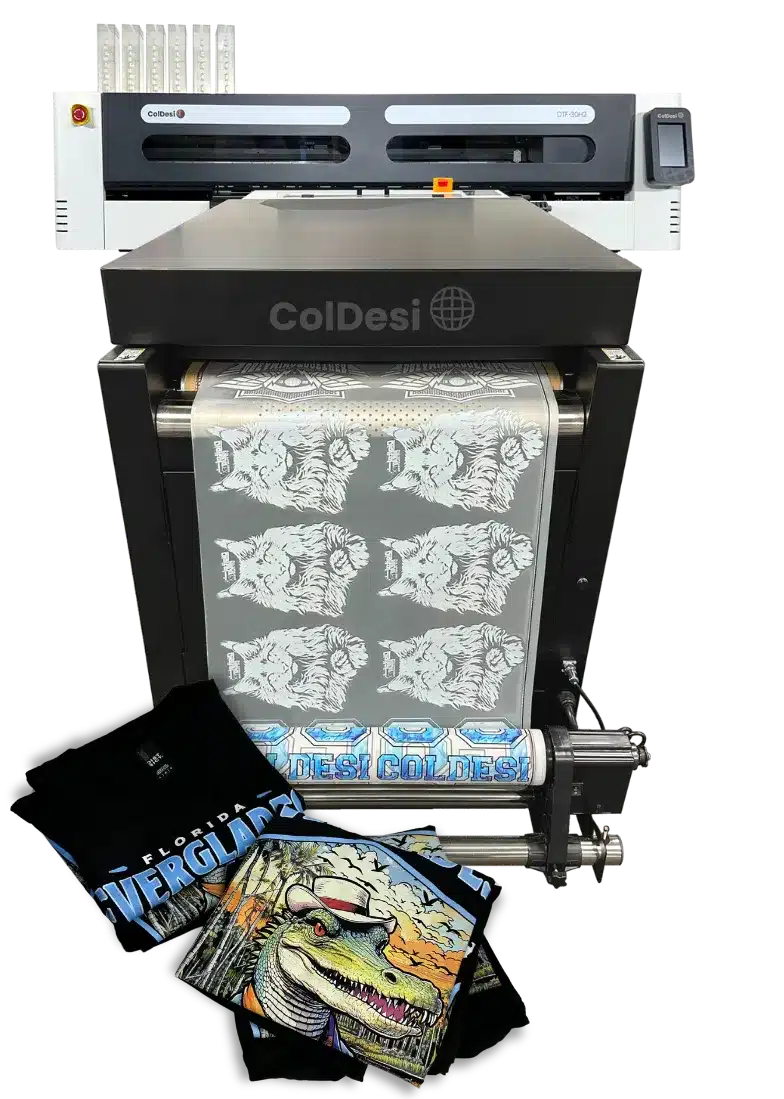
If you’ve been looking at the DTF 24H2 but find yourself wanting a little more print width and production capacity, then the DTF 30H2 is well worth a closer look.
It’s built on many of the same production-focused features as the 24H2 while offering the extra width and output that growing businesses often need. If you’re regularly printing larger orders, oversized graphics, or simply looking to get more work done in less time, the 30H2 was designed with that in mind.
The first thing you’ll probably notice is the expanded 30-inch print width. Under the hood, however, it’s still powered by the same dual Epson i3200 print-head configuration found in the DTF 24H2. The difference is what that extra width allows you to accomplish. The system can produce up to approximately 43 linear feet per hour, which works out to roughly 180 full-size 8 × 10 transfers at an impressive 720 × 1800 DPI. By comparison, the DTF 24H2 tops out at around 100 transfers per hour.
The additional print width makes it an excellent choice for larger production runs and oversized graphics for items like jackets, hoodies, banners, and more. It also gives you the flexibility to gang multiple designs together on a single sheet, helping you get more transfers from every print run while reducing production time and material waste.
Once printed, the finished transfers can be applied to a wide variety of materials, including cotton, polyester, blends, leather, and many other compatible surfaces. Combined with generous 1000 ml ink bags, you can spend more time printing and less time stopping for refills. It’s one of those small conveniences that may not seem like a big deal at first, but it certainly makes busy production days run a little smoother.
Despite its increased production capacity, it’s still worth planning ahead for installation. The complete system measures approximately 69″ × 123.5″ and weighs in at about 1,032.6 lbs.
Like most commercial DTF systems, it’s worth making sure you have enough floor space beforehand to set up the printer.
The ColDesi 30H2 also comes equipped with an Automatic Tension System, often referred to as the Dancer System. Its job is to keep the film feeding smoothly and under consistent tension throughout the printing process. It’s one of those features that’s easy to overlook, but it plays an important role in maintaining consistent print quality and helping reduce the chances of feeding issues during longer production runs.
Altogether, the DTF 30H2 offers a compelling balance of print width, production speed, and reliability for businesses that have outgrown smaller systems and are ready to increase their output without compromising print quality.
ColDesi DTF 24H5
(Best For: High-Volume Production Facilities)

At this point, we’re no longer talking about getting into DTF printing or even growing your business. We’re talking about maximizing production.
This isn’t the kind of printer you buy because you hope orders will come in. It’s the kind of printer you invest in because they already are.
Designed for high-volume production environments, the 24H5 combines a 24-inch print width with five industrial Epson i3200 piezoelectric print heads. Whether you’re fulfilling large contract orders, supplying other decorators with transfers, or simply running the printer from 9 to 5, it’s designed for that kind of workload.
Its production capacity is where the 24H5 really earns its place in the lineup.
Capable of producing up to 160 linear feet of transfers per hour, or roughly 400 standard 8″ × 10″ transfers, it gives busy shops the ability to process significantly more work in the same amount of time. That means large orders move through production faster, while leaving room in the schedule for the next projects.
A big reason for that performance is the printer’s five industrial Epson i3200 piezoelectric print heads that work together. Instead of asking one or two print heads to do all the work, the workload is shared across five. That means higher print speeds, greater ink throughput, and consistent image quality from the first transfer to the last. It also reduces the mechanical stress placed on each individual print head, making the system better suited for the kind of day-in, day-out production commercial shops demand.
The same thinking carries over to the ink system. Large 500 ml ink bottles mean fewer refill interruptions, so your team can spend more time printing and less time stopping to top off ink during busy shifts.
Of course, speed only gets you so far if the finished transfers don’t look exceptional.
That’s where the Expanded Color Gamut option comes into play. By adding Orange and Green inks alongside traditional CMYK and White, the 24H5 can reproduce a broader range of colors with richer saturation, smoother gradients, and more accurate tonal transitions. If you’re printing photographic images, complex artwork, or brand-sensitive graphics where color accuracy matters, it’s a difference you’ll notice.
Naturally, a production system of this caliber requires room to work. The complete setup measures approximately 151″ × 78″ and weighs in at roughly 1,200 pounds. It’s certainly not a desktop printer. But if you’re operating at the level the 24H5 was designed for, chances are you’ve already planned for equipment like this.
The 24H5 represents the top end of ColDesi’s DTF lineup. It’s designed for businesses where high production isn’t an occasional need, but part of the everyday workflow.
And that’s really what you’re investing in.
ColDesi DTF 24H5E
(Best For: Enterprise-Level Production)

Think the 24H5 is impressive? The 24H5E takes it even further.
From the start, the 24H5E was designed as an upgraded version of the 24H5. It keeps everything people already like about the original while adding thoughtful enhancements that make day-to-day production smoother, faster, and more reliable.
So what’s different in this new version?
At the core of the 24H5E are three major enhancements: the 24POWE Extended Dryer System, an Advanced Pre-Heating Chamber, and a fully automated wet-capping system. Together, these upgrades improve printer reliability, streamline workflow, and deliver more consistent output.
The 24POWE Dryer features a built-in fume extraction system, eliminating the need for additional external ventilation units.
This integrated design efficiently filters airborne particles and odors, creating a cleaner, safer, and more comfortable workspace.
To maintain precision throughout every production run, the 24H5E is equipped with a fully automated dancer bar system on both the printer and dryer.
Powered by advanced sensors, the system continuously adjusts to maintain optimal film tension—preventing slack, stretching, or wrinkling and ensuring flawless alignment and consistent, high-quality output.
This automation eliminates manual adjustments and significantly reduces production errors.
And when it comes to performance, the numbers speak for themselves.
Featuring a 24-inch print width and five advanced Epson i3200 print heads, the 24H5E delivers outstanding speed, precision, and reliability for high-volume production environments. In real-world output, it produces 500+ transfers per hour and over 275 linear feet of printed film.
Finally, like the 24H5, the 24H5E goes beyond standard CMYK output. It features an Expanded Color Gamut option with CMYKOG + White (Cyan, Magenta, Yellow, Black, Orange, Green) for richer color and enhanced print results.
In other words, the 24H5E is cruise control for DTF production.
High-Volume DTF Printing Needs High-Volume Heat Application
TO: Anyone pressing DTF transfers all day, this one’s for you.
So, did you find your DTF printer?
With a lineup like ours, there’s a good chance YOU DID! Maybe you went with something compact like the 12H2. Maybe you needed more speed and went with the 30H2 or 24H5. Or maybe you went all-in on the 24H5E!
Whatever you picked, there’s one more part of the process worth thinking about. And that part is getting all those transfers ONTO the shirts.
Now, that might not sound like a big deal (at first). But when you’re doing this all day, every day, it can become one. Because what happens when “a few” turns into 50? Or 100? Or several hundred transfers in a day?
Pretty soon, you’ve got a printer cranking out transfers faster than you can get them onto shirts.
You know the drill…
Someone has to keep loading, pressing, opening, peeling, and unloading, over and over again. And if you’re doing that hundreds of times a day, it doesn’t take long before heat application becomes the bottleneck.
That’s a problem.
You don’t want finished transfers piling up next to the heat press. You don’t want someone standing there all day making the same motions over and over.
And you definitely don’t want your expensive DTF printer sitting idle because the next batch of transfers hasn’t made it through heat application yet.
So what do you do?
You take a closer look at the part of the process that’s holding everything else up. And that brings us to the ColDesi AP360 Automatic DTF Heat Press. The AP360 is designed to tackle exactly that problem: slow, manual heat application.
The AP360 is designed to keep your heat application moving at the same high volume as your DTF printer. And that can make a BIG difference in how many shirts you get out the door.
In fact, depending on your current setup, you could nearly DOUBLE or even TRIPLE your output.
Think about that for a minute.
If you could get two or three times as many shirts through heat application, what would that do for your daily production?
Well, for starters, you wouldn’t have to watch transfers stack up while someone works their way through them one shirt at a time.
Instead, you could actually keep up with what your DTF printer is producing (and keep more shirts moving toward the finish line).
So, what does that actually look like?
Watch the AP360 in action below.
And if you want to see the machine, features, and capabilities in more detail, check out the AP360 product page HERE.
Answers to Frequently Asked Questions about DTF Printers
Now, if you’re still with us, there’s probably a good chance you’ve got questions of your own about DTF printers.
And that’s understandable.
If we were in your shoes, we’d probably have a few questions too.
If anything, we’d expect you to have them.
Because this isn’t something you want to guess your way through.
After all, you’re looking at an investment, and you’d want to know exactly what you’re getting into before making a decision.
So, let’s answer some of those questions.
Here are some of the most frequently asked questions about DTF printers.
Question 1: What is the best DTF printer for a small business?
The answer depends on your production volume, available space, print width and how quickly you expect to grow.
The 12H2 is a compact option for smaller operations, while the 19H2 gives you more print width and capacity if you expect bigger orders
Question 2: What DTF printer should I buy for a growing print shop?
If your shop is growing, you want a machine that can keep up with you for a while rather than one you’ll outgrow six months from now.
The 19H2, 24H2 and 30H2 give you progressively more print width and production capacity, so the right choice really comes down to how much you’re producing today and where you expect to be tomorrow.
Question 3: What is the best DTF printer for high-volume production?
If you’re doing high-volume production, you’re going to want a machine that can keep up with it.
That’s where the 24H5 and 24H5E come in.
They’re built for serious production and much higher throughput than the other machines in the lineup.
Question 4: Do DTF printers need a dryer?
Yes. A dedicated dryer is non-negotiable for DTF printing, also commonly called a shaker/dryer.
Here’s why.
DTF printers require a drying or curing process to set the print. The printed film needs adhesive powder applied and then cured before it can be pressed onto a garment.
In simple terms, the process involves printing liquid ink onto film, depositing hot-melt adhesive powder over the wet print, and using the shaker’s vibrating mechanism to help distribute the powder and remove the excess before it is melted and cured.
Question 5: What equipment do I need for commercial DTF printing?
You’ll need a DTF printer, powder shaker/dryer, heat press, computer and RIP software, along with compatible film, ink and adhesive powder.
You’ll also need enough floor space to actually fit everything in where it belongs and still have enough space to comfortably operate, load and unload the machines.
Question 6: How do I choose the right size DTF printer?
Consider the sizes of the designs you’ll be printing, how much floor space you have, and where you expect the business to go.
And if you’re still testing the waters and aren’t quite sure how far you’re going to take it, the 12H2 or 19H2 can give you a sensible place to start without jumping straight into a much larger production setup.
Question 7: Can DTF printing be automated?
Yes! And the good news is that most of the DTF process is already highly automated.
The printer handles the printing. The shaker/dryer takes care of the powder application and curing. And with the AP360, you can automate the heat-press stage too. So, very little of the DTF process actually needs to be done by ‘hand’.
But don’t take “automated” to mean “walk away and come back later.” You’ll still have to load materials, monitor the equipment, handle garments and transfers, and take care of routine maintenance.
Question 8: What support should I look for when buying a commercial DTF printer?
This is one of those questions you really don’t want to ask after you’ve bought the machine.
Find out what training and onboarding you’ll get, how technical support works, whether the necessary consumables are readily available, and who will actually service the equipment if something goes wrong.